TV Home: rebuilding my TV with AI
How I designed and built a custom home screen for Google TV with AI. From the brief and glass UI to a voice assistant.
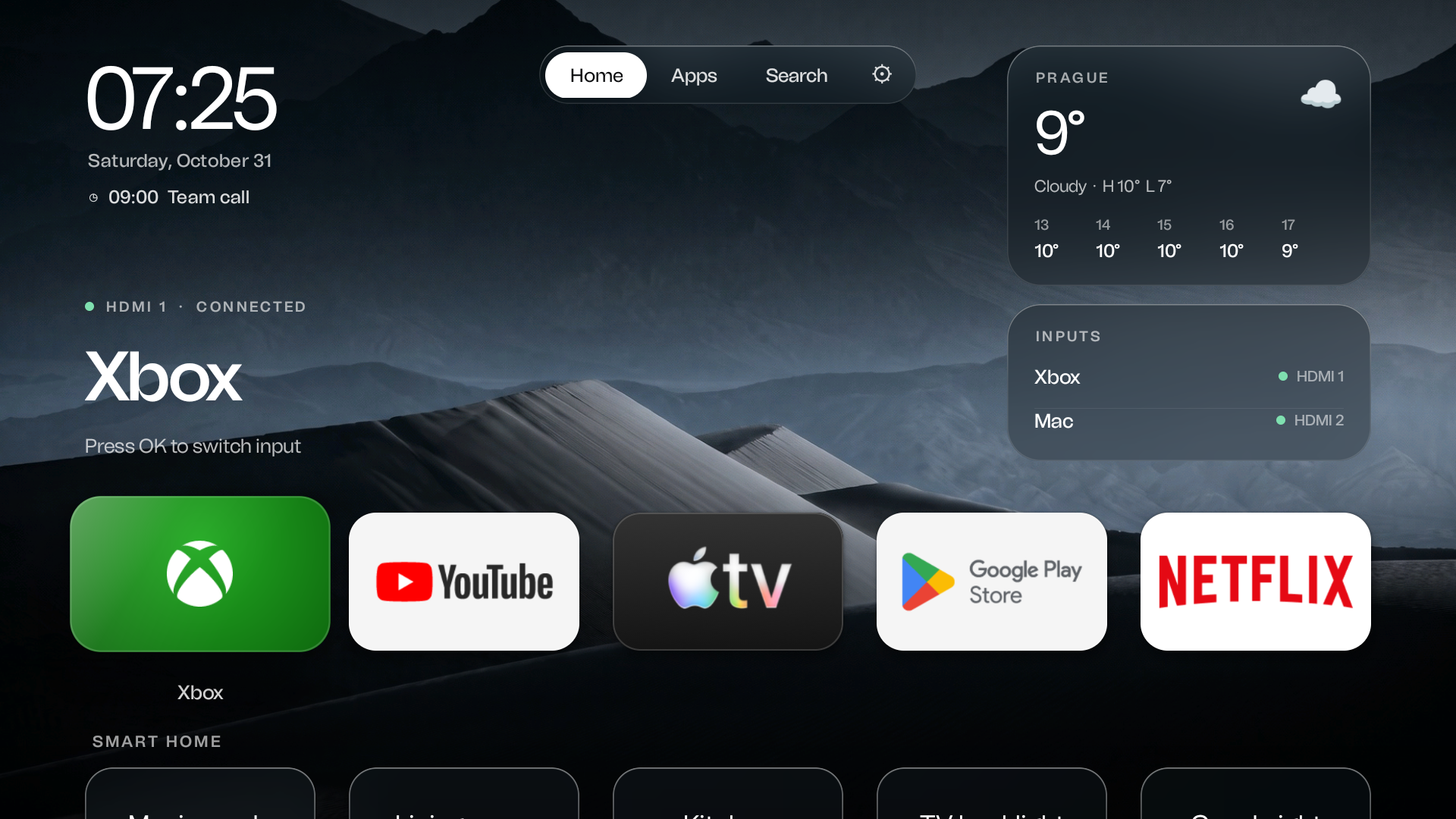
Version 0.9 interface shown in the Google TV emulator.
From brief to result
How I made it
- 01
Define the actual scope
I wanted a custom TV home screen: large tiles, my apps and no advertising rows. I chose a launcher on top of Android TV. It replaces the home screen rather than rewriting the operating system.
- 02
Design before implementation
Claude Code produced several HTML concepts. I refined tile size, transparency and typography, and made custom wallpapers with Eden Gen and Nano Banana Pro. The selected direction then became a Java interface.
- 03
Give the remote a new role
Gemini powers the voice assistant. The project includes search, app launching and input control, plus phone setup through a QR code. These functions need testing on each particular TV and remote.
- 04
Review screen by screen
Development and initial tests ran in a Google TV emulator. I gave specific visual feedback on individual screens, checking focus, transitions, clipping and returning to Home.
- 05
Present the result on video
An HTML counterpart of the interface, HyperFrames animation and Blender TV shots were made for the presentation. These visuals demonstrate the design; they do not replace performance measurements or tests on real hardware.
The brief that started it
The brief that started itClaude Code
Čau, čau, čau, teď frčí takový trend, že lidi si wipekódujou vlastní operační systém na televize a tak dál. Můžeš se kouknout na mojí televizi, co já mám, přes lokální Wi‑Fi nebo něco takovýho, a zjistit, jak to můžeš zlepšit, zjednodušit, udělat to víc jako Apple TV a tak dál. Zkus se na to kouknout a zkus zařídit co nejvíc věcí, co můžeš. Mám nějaký TCL.

https://x.com/SimbasJungles/status/2112231637840765012
https://x.com/gathint/status/2111379569030939102
https://x.com/samraaj/status/2114770776411041933
https://x.com/0xProbabillity/status/2112179515929583871
https://www.youtube.com/watch?v=i7t-GpV72F4
https://www.youtube.com/watch?v=i0ytu6k8uac
Know-how
What made the difference
Glass without live blur
This implementation blurs the wallpaper ahead of time. Glass panels display the matching portion of that image instead of recomputing the entire background every frame.
One prompt was only the start
The short brief opened the project. The finished interface took further concepts, feedback and fixes. Specific feedback about individual screens mattered.
The emulator is not the TV
A good emulator result does not confirm HDMI switching, remote buttons or smoothness on the television. These require separate device tests.
Interface presentation versus the running app
The HTML counterpart enabled sharp close-ups and controlled camera moves for the video. Launcher functionality is evaluated in the app, not from these animations.